
"The ChatGPT agentic storefront is now enabled in my account with no way to turn it off... 4% commission."
That is a Shopify merchant on r/shopify earlier this year. Half of it is right and the wrong half is the half that matters, which is a good reason to go through this carefully rather than from memory.
We pulled 433 merchant posts and comments and read the 100 that were actually about AI shopping, 31 posts and 69 comments across r/shopify, r/ecommerce, r/SEO, and r/bigseo. Four worries come up far more than anything else, and they are the right four:
- Can I turn it off? Partly, per channel, and never completely
- What is the commission? Zero today, and the agreement you signed defines one anyway
- Who eats the return? You do, and there is a second-order risk nobody in those threads mentioned
- Do I still own the customer? Yes, and the documentation is specific about the limits
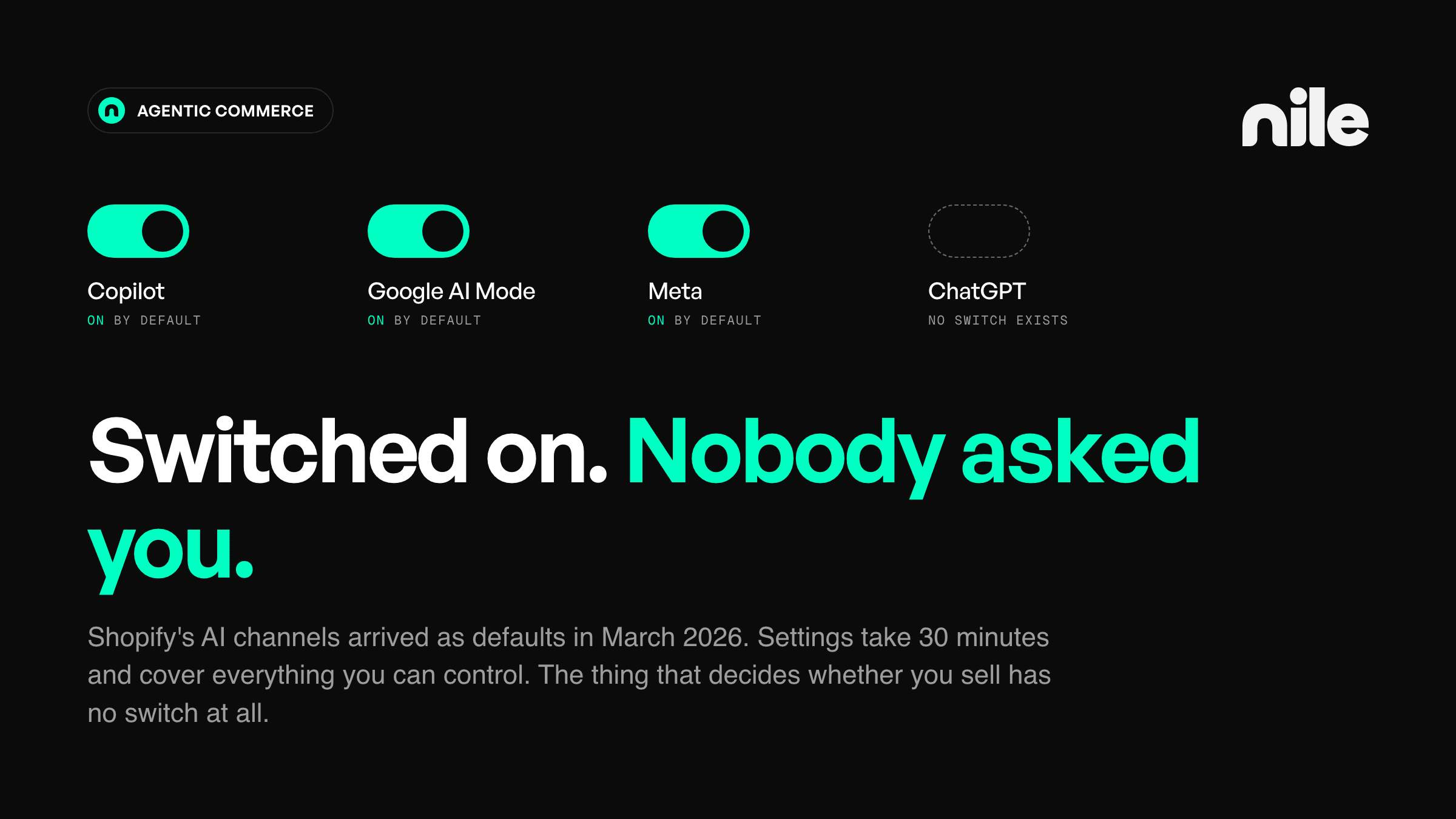
If you run a Shopify store, your products are most likely discoverable inside ChatGPT right now and you did not turn anything on. Shopify's agentic storefronts channel has been active by default for eligible stores since March 2026, covering ChatGPT, Google AI Mode and Gemini, Microsoft Copilot, and Meta. A default you did not choose is still a choice.
There is also a fifth thing, with no setting anywhere, which decides whether any of this produces an order. That is the last section.
This piece is written against the Shopify admin, because that is where the switches are and vague instructions are useless mid-task. On another platform the dynamic is identical and the settings are not: AI channels are arriving as defaults rather than as decisions, discovery and checkout have come apart, and no admin anywhere controls whether you get recommended.
Current as of early September 2026. This area has moved three times in twelve months, so verify every fee, channel, and geography claim in your own admin, including the ones here.
Participation: which AI channels carry your products
There was no install, no app, and no opt-in step for most stores, because the channel runs on catalog data Shopify already had. Awareness came after activation, through whichever door you happened to pass: an email, the Editions announcement, the posts written about it, or the new section already sitting in the admin.
Everything below lives in one place. From your Shopify admin, go to Settings > Sales channels, then the Agentic section, then the individual channel.
The first thing on that page is not a channel but a master switch: Allow Shopify to manage for me. On, which is the default, it gives agentic channels access to your products through Shopify Catalog, activates direct checkout on the channels that offer it, and auto-enrolls you in new agentic channels as they launch. Turn it off and it splits into two controls you can set separately: Auto enroll new storefronts, which decides whether future channels get to add themselves, and Allow catalog access, the global feed switch.
Watch what the global feed switch does not reach, though. Flip catalog access off and ChatGPT and Copilot go grey, but Meta can stay active, because shoppable ads there run on product syncing through the Facebook and Instagram channel rather than on Shopify Catalog alone. The Shop app is its own channel with its own settings. Even the biggest off-switch on the page only governs what Shopify Catalog feeds. Most of the defaults this piece describes trace back to this one switch, so decide your stance on it before touching anything downstream.
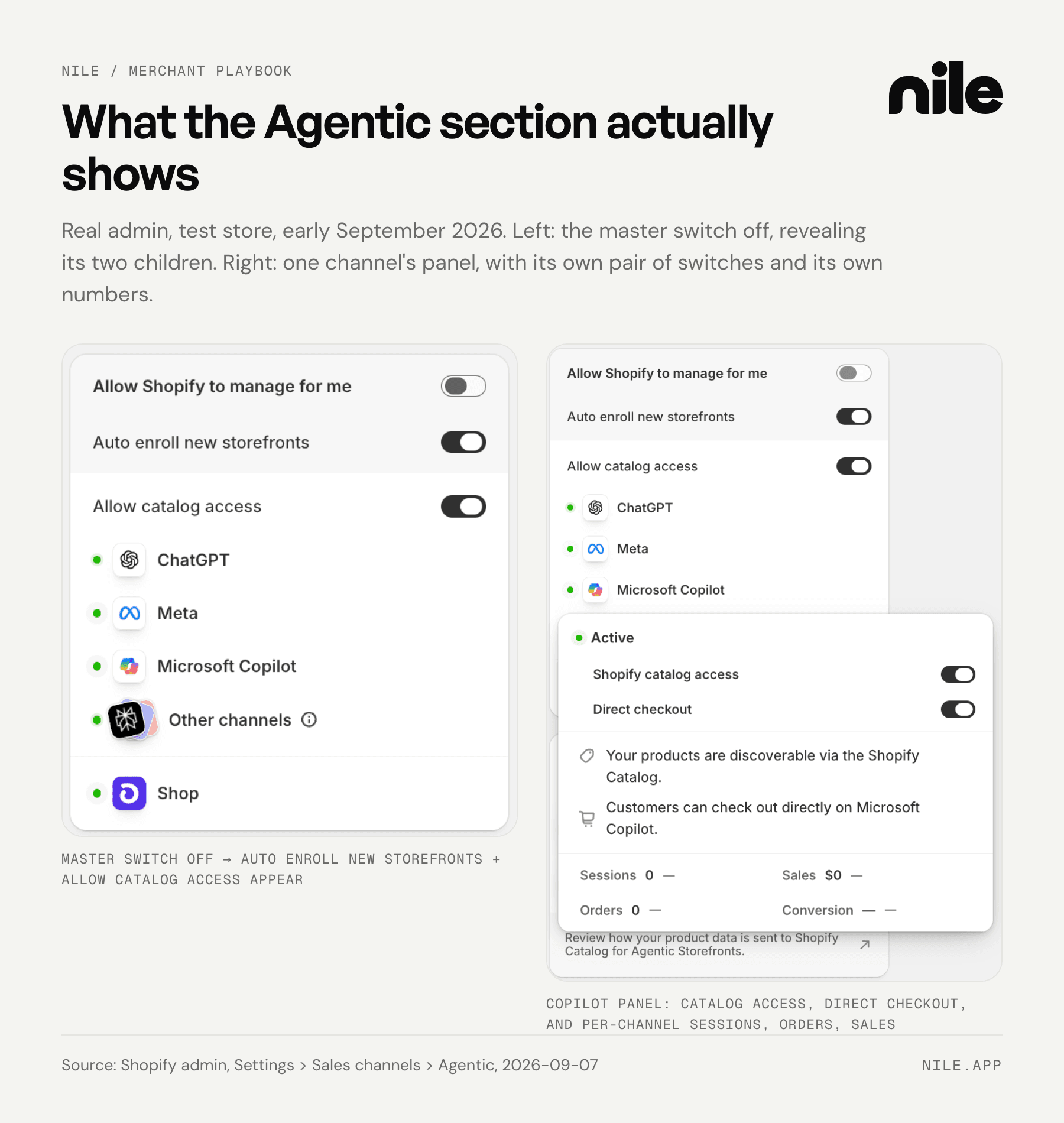
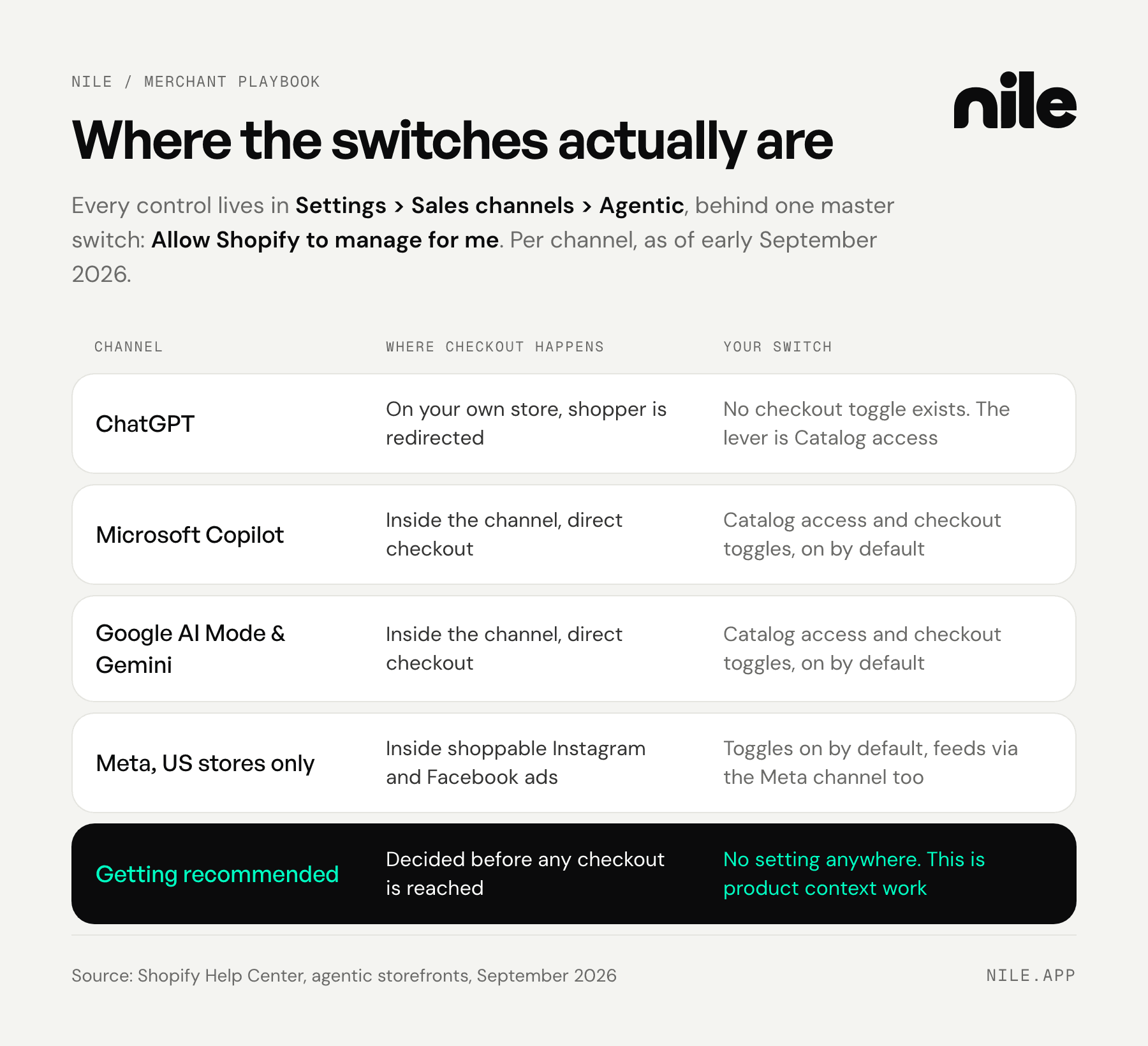
ChatGPT has no checkout toggle, and it is worth understanding why rather than hunting for one. Shoppers who find your product in ChatGPT are redirected to your own store checkout, so, in Shopify's words, there is no option to activate or deactivate a ChatGPT direct checkout setting. There is nothing to switch off because there is no in-chat transaction to switch off. OpenAI retired the first version of Instant Checkout in March 2026 and moved ChatGPT back to product discovery. Do not read the retreat as final, though: OpenAI's developer documentation once again specifies an end-to-end checkout that runs inside ChatGPT, and its Apps SDK documents an in-app checkout running today as a private beta, limited to select marketplace partners. Nothing of that shape has reached the Shopify channel yet, so your lever here is still Shopify Catalog access. The ChatGPT panel carries exactly one switch, catalog access, and nothing else.
The direct checkout channels are Microsoft Copilot, Google AI Mode and Gemini, and Meta. Here the shopper completes the purchase inside the AI channel without leaving it, and direct checkout is on by default for eligible stores. This is a real per-channel toggle and it is on unless you turned it off. Open any channel's panel and you get its own pair of switches, Shopify catalog access and, where the channel supports it, direct checkout, plus that channel's sessions, orders, and sales, which makes the panel the quickest read on whether a channel is producing anything.
Eligibility is narrower than the channel list suggests, and it differs per channel. Meta's direct checkout runs on shoppable ads on Instagram and Facebook, and requires a store based in the United States selling to customers in the United States. Copilot requires that you sell to customers in the United States. Google's requirements differ again and are worth reading in your own admin rather than taking from any list, this one included. All of them require published policies, including a completed return and refund policy.
Where checkout happens decides your branding, analytics, and email capture
This is a more useful frame than any fee number. Checkout on your store means your branding, payment methods, post-purchase flows, and analytics all apply as normal. Today that covers ChatGPT and any channel where you switch direct checkout off. Direct checkout inside the channel means the purchase completes on a surface you did not design, so your upsell and your email capture are not in that moment.
Where a channel sits on that line tells you more about your exposure than the commission question does.
Cost: zero today, and the mechanism already exists
Shopify's help pages are unambiguous: there are no fees associated with selling in agentic storefront direct checkouts, and you pay only your standard payment processing fees.
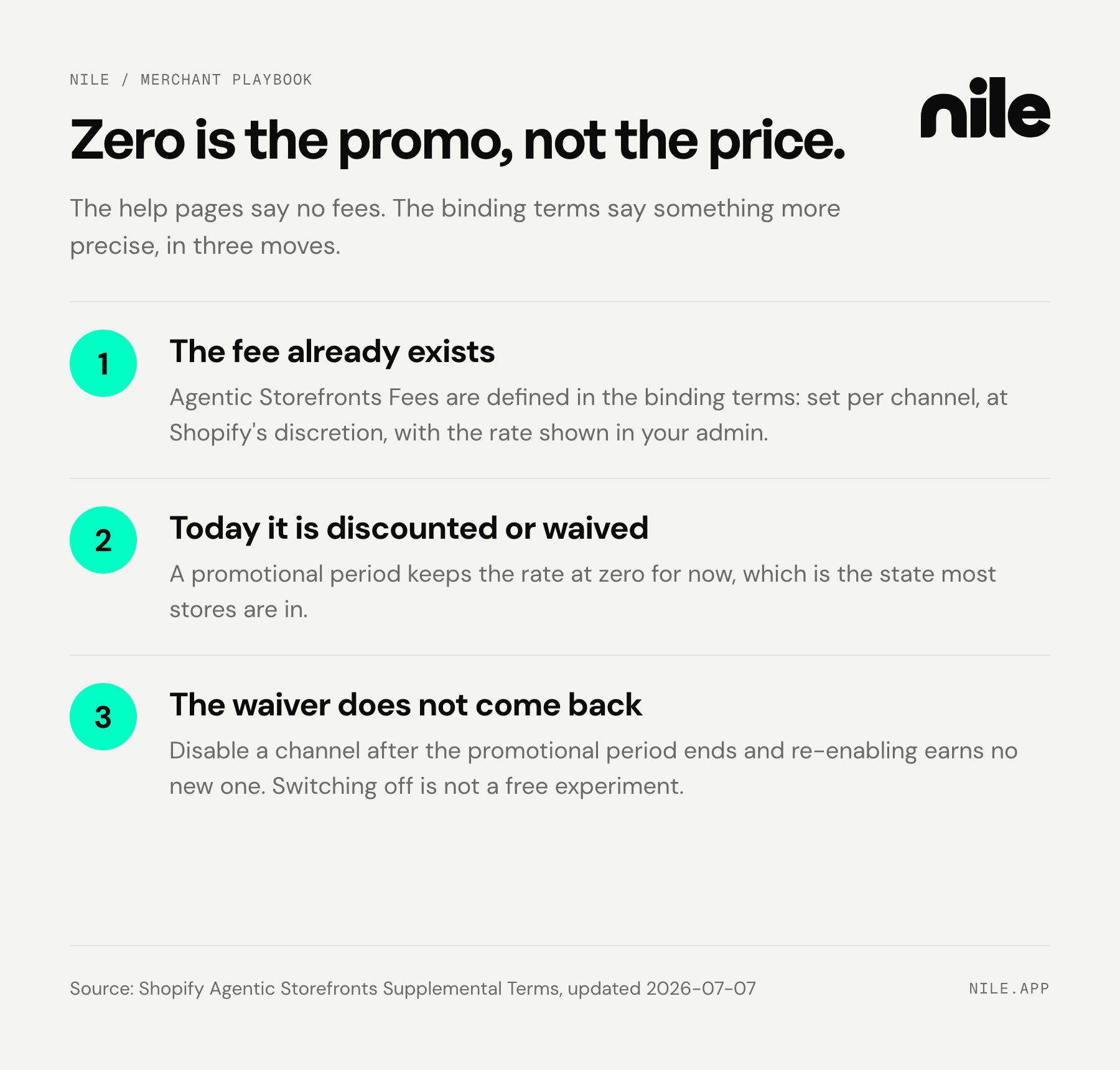
Now read the binding document instead of the help article. Shopify's Agentic Storefronts Supplemental Terms define a category called Agentic Storefronts Fees: a fee Shopify "may, in its discretion, assess" on transactions arising from your participation, charged in addition to your subscription and transaction fees, collected by your payment processor on Shopify's behalf, set per participating channel, with the rate appearing in your admin rather than published anywhere. The terms also provide for a promotional period in which those fees are "discounted or waived," which is the state most stores are in now.
So the accurate sentence is not that the channel is free. It is that the fee is defined, the collection path is built, today's rate is zero or waived, and the number lives in your admin. Zero is an acquisition price, not a steady state. Model your unit economics against a take rate appearing once these surfaces carry volume.
One clause deserves reading twice, because it changes a decision rather than a fact:
If you disable a Participating Channel for your Shopify Store after the expiration of the Promotional Period, you will not be eligible for an additional Promotional Period if you re-enable your participation with that Participating Channel.
In plain terms: the zero you pay today is a waiver with an expiry date, not the price. Once your waiver expires, a channel you switch off and back on never gets another one, so any fee relief Shopify grants through promotional periods is gone for that channel for good. Switching off to wait and see is not a free experiment.
What opting out actually does
Opting out is partial by design.
Turn off direct checkout and shoppers still discover your products. They are simply redirected to your store to buy. You have not left the channel, you have moved the transaction back to your own checkout.
Deactivate Shopify Catalog access and Shopify is explicit that your products "might still be displayed or referenced by the AI channel through other external discovery and listing methods, such as web crawling and indexing." Your storefront is on the public web, and turning off a feed does not make it unreadable. Allow time, too: Shopify documents up to seven days before your product data stops being shared through Shopify Catalog, and publishes no timeline for the per-channel toggles. Switch off early and verify rather than trusting a number.
The honest summary: you control whether you supply a structured product feed, and you control where money changes hands. You do not control whether an AI assistant can discuss products you have published on the open internet.
Data: what arrives, and what the channel never sees
On a direct checkout order you receive a real customer record: name, email address, phone number, and physical address. Orders appear in your admin with channel or referrer attribution, so you can see where each one originated.
In the other direction, Shopify's data sharing documentation is specific about the limit: "AI channels don't have access to your full order history, orders from other sales channels, or your general customer database," and your private admin data "remain confidential and aren't shared."
One genuine gap: marketing consent handling is not documented on either side. Confirm how it arrives on a live test order before these orders touch an email program.
Liability: yours, and your policy pages are now agent inputs
Returns, refunds, chargebacks, tax, and customer service stay with you, because you are still the seller. Under the Agentic Commerce Protocol, OpenAI is explicitly not the merchant of record: the merchant validates the order, calculates tax, assesses payment risk, processes the charge, and accepts or declines it on their own systems, even where the checkout interface is rendered elsewhere.
Liability being unchanged is not the same as risk being unchanged, and this is the part that catches people.
A buyer who reaches your checkout from an AI assistant never visited your site and never read your returns policy. They were handed a one-sentence paraphrase of it at the moment of decision. If that paraphrase was more generous than your actual terms, you absorb the gap, in refunds and in reviews.
Merchants are already seeing the shape of this. One merchant put it plainly: "We have already had a customer buy the wrong product as they used AI and never read the description." That is a product data problem arriving as a return.
So your returns, shipping, and warranty pages have stopped being only legal documents. They are inputs an AI assistant reads and compresses, and the compression is what the buyer believes. Vague policies compress badly.
The one thing with no setting
You control the plumbing. You do not control whether you get named.
When a shopper asks for a recommendation, the AI assistant produces a shortlist of two or three products with reasons attached. Being in the channel makes you eligible for that shortlist. It does not put you on it. That decision is made from whatever structured information about your products the AI assistant can find and trust. OpenAI's commerce documentation treats price, availability, and checkout status as required, and rich media, reviews, and performance signals as recommended attributes that improve ranking and relevance.
The failure mode here is quieter than a bad ranking, because nothing flags it. It shows up as nothing: no traffic, no order, no signal that you were considered and passed over. A commission at least arrives as a line item you can argue about.
Put those side by side and the worry list inverts. The commission is visible, currently zero, and easy to argue about, which is why the threads are full of it. Being silently passed over has no line item anywhere, and it is the thing that decides revenue. So give the settings the half hour they need, and spend the week you were going to spend on the fee question here instead.
Getting named is the part Nile works on. We turn a brand's existing catalog into structured product context that AI assistants can match against real shopper intent, and we track the path from click to purchase. Commission only, 3% of attributed sales, no listing fee and no monthly fee.
Your 30-minute checklist
- Open Settings > Sales channels > Agentic. Start with the master toggle at the top, Allow Shopify to manage for me: while it is on, new AI channels enroll you automatically as they launch. Decide that one first, then note which channels are listed and active.
- Check the direct checkout toggle on Copilot, Google, and Meta. It is on by default. ChatGPT has none, so do not go looking.
- Read the Agentic Storefronts Supplemental Terms and find the fee field in your admin. That language binds you, a help article does not.
- Before switching anything off, check your promotional period status. Disabling a channel after it ends forfeits the waiver permanently.
- Place a test order through a direct checkout channel. Confirm which customer fields arrive, whether marketing consent comes with them, and how the order is tagged. This one test answers more than a week of reading.
- Check whether AI channel orders have started arriving. Each channel's panel under Agentic shows its own sessions, orders, and sales, and your orders list filters by channel or referrer attribution.
- Audit your returns, shipping, and warranty pages as agent inputs. The test is mechanical: paste each page into an AI assistant and ask for the one-sentence version a shopper would be told. If that sentence comes back vaguer or more generous than your actual terms, rewrite the page until the compression is accurate.
- Ask an AI assistant two questions. First ask about your own products by name, phrased the way a buyer checking details would. Copy this and swap in your own names: "Is the [brand] [product] in stock right now, what does it cost, and is it machine washable?" Stock and price live in the product feed, so the answer tells you two things at once: whether the AI is reading your catalog data or scraping stale pages, and whether what it says is accurate. Then ask the buying question your best customer would actually type, constraints included rather than the bare category name, and see whether you make the shortlist. A smaller store missing from a broad category question is normal. Missing from the narrow question your own buyer asks is the signal. This is the only item you cannot fix in settings.
The first seven take half an hour and settle the plumbing. The eighth decides whether any of it produces an order, and nothing in your admin answers it.
For the strategic frame behind this, agentic commerce behaves like a channel rather than a storefront, "being on ChatGPT" turns out to mean several different things, and the layer that decides whether you get named sits above your catalog.
Connecting your catalog to Nile takes a few minutes and costs nothing until it earns you a sale.
Frequently asked questions
Can I fully opt out of AI channels?
Not completely. Start with the master toggle: turning off Allow Shopify to manage for me stops new AI channels from enrolling you automatically. Then you can turn off direct checkout on the channels that offer it, and you can deactivate Shopify Catalog access. Shopify is explicit that afterwards your products "might still be displayed or referenced by the AI channel through other external discovery and listing methods, such as web crawling and indexing." Allow up to seven days for catalog data to stop being shared, and note that no timeline is published for the per-channel toggles, so switch off early and verify.
Is there a commission on AI channel sales?
Not today. Shopify's help pages state there are no fees for agentic storefront direct checkouts beyond standard payment processing. The binding Agentic Storefronts Supplemental Terms separately define an Agentic Storefronts Fee, assessable at Shopify's discretion per channel, collected by your payment processor, with the rate in your admin and a promotional period during which it is discounted or waived. Separately, Ann Gehan at The Information reported in January 2026 that OpenAI would charge 4% on completed purchases from 26 January, applied to the Instant Checkout flow OpenAI retired in March 2026. Its current status cannot be established from public documents.
Who handles returns and refunds on an AI channel order?
You do. You remain the seller, and Shopify states you retain full ownership of the customer relationship and post-purchase experience. Under the Agentic Commerce Protocol, OpenAI is explicitly not the merchant of record. The practical risk is not liability, which has not changed, but expectation: buyers arrive having read an AI assistant's compressed version of your policy rather than your policy. Write the policy so the compression is accurate.
Do I still own the customer?
Yes, on the record. Direct checkout orders bring name, email, phone, and address, orders carry channel or referrer attribution in your admin, and AI channels do not get your full order history, orders from other channels, or your general customer database. Marketing consent handling is not documented on either side, so confirm it on a live test order before you assume anything. What you no longer own is the first impression, since discovery and comparison happened somewhere you were not present.
Will this cannibalize my direct-to-consumer sales?
Partly, and nobody can separate the two cleanly right now. For ChatGPT the purchase completes in your own checkout, so the order arrives through your normal flow with attribution attached. The real question is not cannibalization but incrementality: whether that order would have happened anyway by another path. Anyone quoting you a confident incremental number is guessing. Measure it before you treat the channel as either a threat or a win, and be suspicious of your own last-click reporting.
Sources
- Shopify agentic storefronts — Shopify Help Center (accessed 2026-08-26)
- Selling on ChatGPT — Shopify Help Center (accessed 2026-08-26)
- Using AI channels with direct checkout — Shopify Help Center (accessed 2026-08-26)
- Managing agentic storefronts — Shopify Help Center (accessed 2026-09-07)
- Selling on Meta — Shopify Help Center (accessed 2026-08-31)
- Data sharing and privacy for selling with agentic storefronts — Shopify Help Center (accessed 2026-08-31)
- Agentic Storefronts Supplemental Terms of Service — Shopify Legal (accessed 2026-08-31)
- OpenAI revamps shopping experience in ChatGPT after struggling with Instant Checkout offering — CNBC (accessed 2026-08-26)
- Reporting that OpenAI would charge 4% on completed purchases effective 2026-01-26 (paywalled) — The Information
- Agentic Commerce: key concepts — OpenAI Developers documentation (accessed 2026-08-26)
- Agentic Checkout Spec — OpenAI Developers documentation (accessed 2026-09-07)
- Monetization, Apps SDK — OpenAI Developers documentation (accessed 2026-09-07)
- Merchant voice sample: 433 Reddit posts and comments collected, 100 coded as relevant, across r/shopify, r/ecommerce, r/SEO, and r/bigseo, August 2026 — Nile primary research